Posts

Solfege UI Blogger Template Forums

Image
Solfege UI Blogger Template Forums Solfege UI Blogger Template is the BIGGEST Forum Theme ever made on Blogger, 2 DIFFERENT theme Layouts with the same content box that allows you to create powerful pages with unlimited possibilities. ? Template Info  Name:  Solfege UI Platform:  Blogger Designer:  Mian Saab Price:  9.99 $ Buy Now Live Priview You can use Solfege UI for any purpose starting from business, marketing, corporate, app, creative, minimal, professional, and Education.​ 🔥 Solfege UI Blogger Template Features Google Web font is easily configured. Node Background Avatar Shape Guest Message Text Logo Remove Sub-navigation row Collapsible Categories Sticky Category Strips Simplified Node Statics "New" Indicator Label Sidebar Position Sticky Sidebar Collapsible Sidebar Collapsible Sidebar Blocks Separate Sticky Threads Show avatar of who last posted Three Different Messages Layout First Post Unique Background Offline status indicator Collapsi...
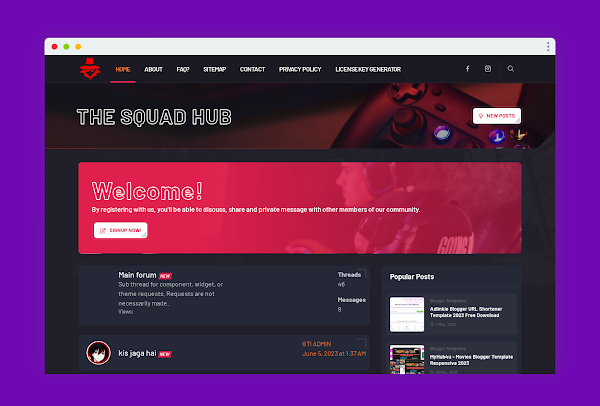
Thesquadhub Blogger Template Premium Forum

Image
👉 Thesquadhub Blogger Template Premium Forum A professional-looking blog Increased traffic from search engines Improved user experience Easy to customize Free to download 📁 Download Link:   https://mega.nz/file/gL0mjCbB#F8_ME59b2xEa18InMWDWZgXpjI31iJJLt4UN0E-lHBw 🔑 License Key:   https://www.thesquadhub.pro/p/license-generator.html 

LinkMagz Blogger Template For Movies

Image
LinkMagz blogger template is designed for Download movies, but it can be tweaked for movie reviews. Imagine each movie as a product. You'd use the template's title slot for the movie name, its image slot for a cool poster, and the description area for your review. This creates a visually interesting way to share your movie thoughts on your blog. 👀 Demo :  https://xenlinkmagz.blogspot.com/ For Downlaod This Theme To Join On Telegram https://t.me/xenpluse

XenPlus Custom Post Container Examples

Image
Custom Post Container Examples Since version 2.1 , XenPlus added custom containers including tip , warning , danger and details . Block quote normal quote block. Custom Containers Tip Container hint Normal Tips Container Warning Container Notice Warning!!! Danger Container pay attention Danger!!!

Solution to the problem “You need the official WhatsApp” in WhatsApp (final solution)

Image
Some people are exposed to a problem when opening the original WhatsApp application, especially when registering the user’s phone number in order to run the application, and then the user appears a message that he must use the official WhatsApp application to log in. This message prevents the user from opening or activating the original WhatsApp application, which causes... The problem is a lot of anxiety and stress for many users, but in reality it is a problem that is easy to solve through XenPlus.  Follow the article to learn about the solution The problem of not opening the application and the message appearing is something that some people think is a complex problem, but through the following paragraphs we learn together about solving a problem that requires the official WhatsApp application to use this account through some easy steps that the user can complete with ease. Solution to the problem: You must use the official WhatsApp application to log in To solve this problem, t...

Change Default Blogger Logo Image in Comments

Image
Change Default Blogger Logo Image in Comments To replace the default Blogger logo image ( https://blogger.com/img/blogger_logo_round_35.png ) in the comments section with a custom image using JavaScript, follow these steps: Step-by-Step Guide Log in to Blogger: Go to Blogger and log in with your Google account. Access Your Blog: From the Blogger dashboard, select the blog you want to edit. Navigate to the Theme: In the left sidebar, click on "Theme" . Edit HTML: Click on "Edit HTML" . This will open the HTML editor for your blog’s template. Add JavaScript Code: Scroll down to the closing </body> tag and insert the following JavaScript code just above it. JavaScript Code <script type="text/javascript"> document.addEventListener("DOMContentLoaded", function() { // Select all comment avatars var commentAvatars = documen...

Hello World

Hello World